

A native Mac IDE for PlantUML
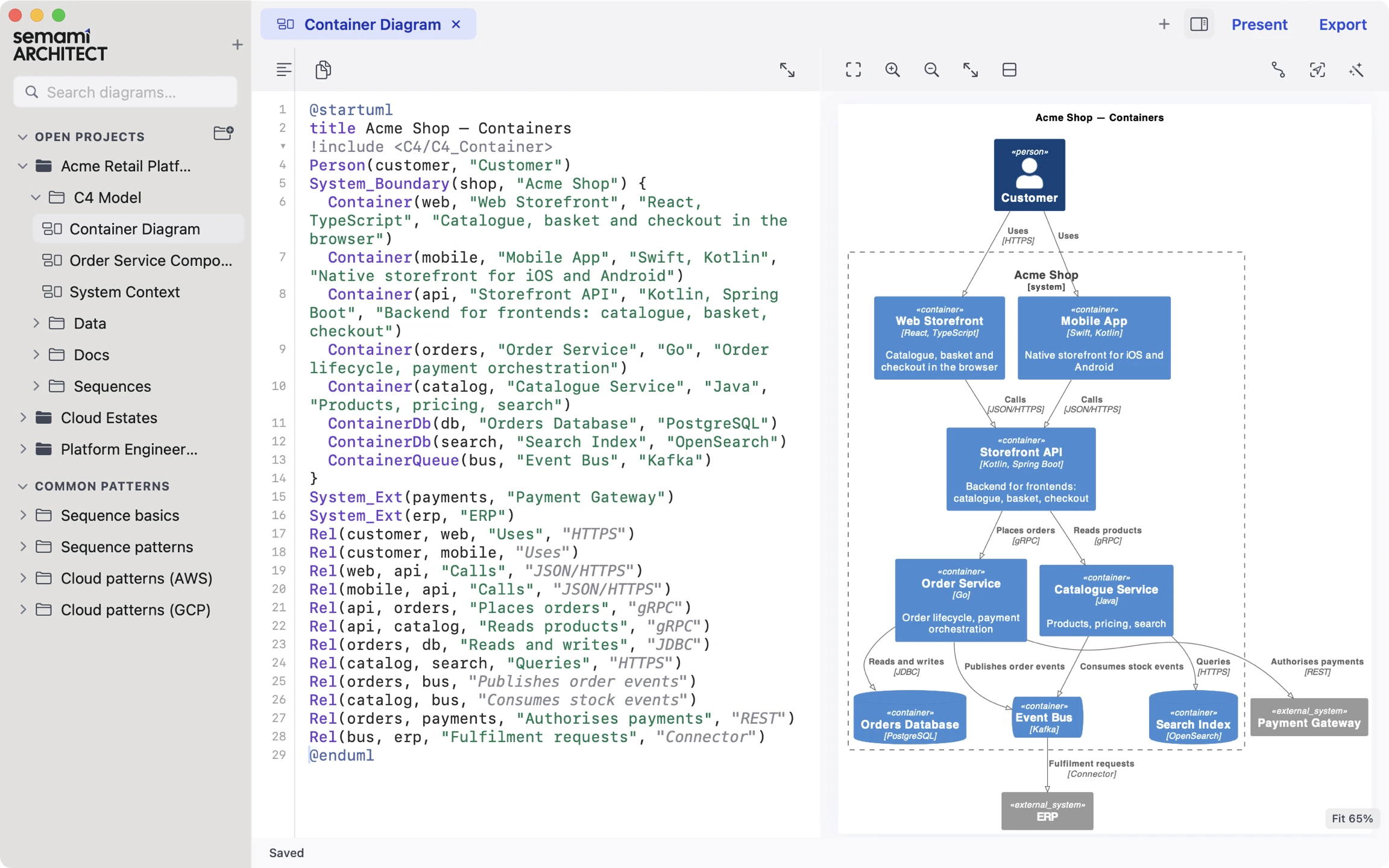
Architecture diagrams as code, edited from either side: type PlantUML and the diagram redraws, or work on the diagram itself (add, connect, move and delete elements) and the source follows.
Nothing to set up
Everything PlantUML needs is already inside
PlantUML, the usual way
$ brew install openjdk
$ brew install graphviz
$ curl -LO https://…/plantuml.jar
$ java -jar plantuml.jar -tsvg containers.puml
$ open containers.svg
# edit, re-run, refresh, repeat.
# Editor plugins usually need the same
# installs, or send your diagram to a server.
Semami Architect
Open the app.
- The engine is PlantUML itself (1.2025.4, MIT build) with its own Java 21 runtime, not a lookalike, so standard PlantUML files render without changes.
- Layout uses Smetana, PlantUML’s built-in port of Graphviz, so there is no Java or Graphviz to install. A Smetana layout can differ from a Graphviz one.
- Diagrams are drawn on your Mac, never on a server, so it works offline.
- Native on Apple silicon, with dark mode, full keyboard control and VoiceOver labels on the controls.
Live preview
Edit the picture. The source follows.
The diagram redraws as you type, and the picture is editable too: every gesture on it is an ordinary text edit, so ⌘Z undoes it and git sees it.
- ClickJump to the line that drew an element or arrow. Move the caret, and that element is highlighted.
- Double-clickEdit names, labels, notes and table rows in place. Return commits, Esc cancels.
- Drag from the LibraryDrop an icon onto the diagram or into a boundary; the element and its includes are written for you.
- Connect⌥-click one element, then click another, to add a relationship between them.
- Drag an arrow endDrop it on another element to retarget the relationship.
- Drag a boxDrop an element into another boundary, and its line moves into that block.
- Right-clickChange a colour, a relationship’s type or direction, add a note, or delete an element and every line that refers to it.
- MistypeThe last good picture stays up, and the broken line is marked.
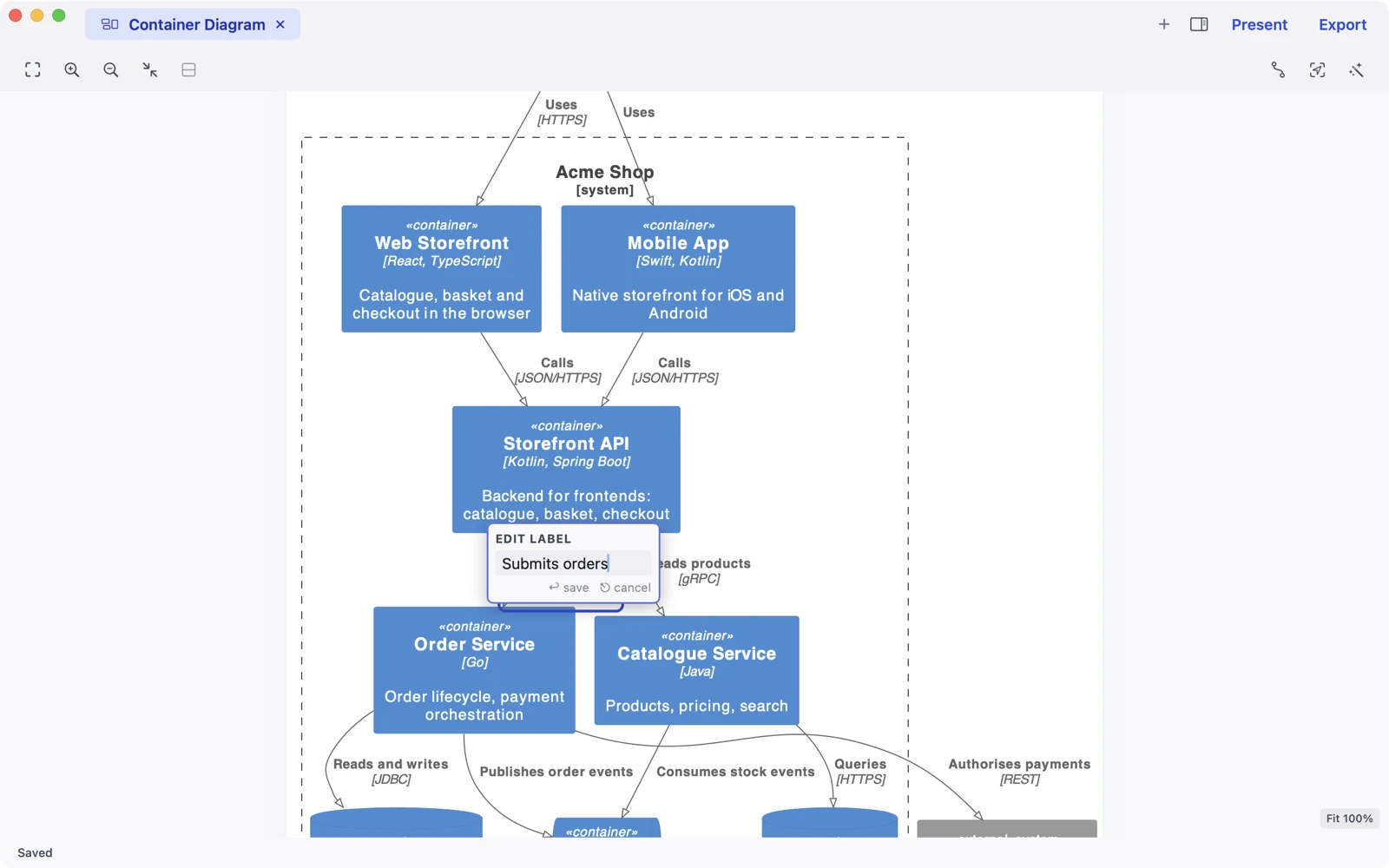
Diagram types
The diagrams architects draw
Each one below is a plain PlantUML file and the picture the app draws from it. New diagrams can start from a template, and the Reference section in the sidebar holds worked examples to copy.
C4 model
Context, container and component diagrams, with the C4 library built in.
System Context.puml
@startuml
title Acme Retail — System Context
!include <C4/C4_Context>
Person(customer, "Customer", "Browses the catalogue, places and tracks orders")
Person(support, "Support Agent", "Handles refunds and order changes")
System(shop, "Acme Shop", "Online storefront, checkout and order management")
System_Ext(payments, "Payment Gateway", "Card authorisation and capture")
System_Ext(email, "Email Service", "Transactional email delivery")
System_Ext(erp, "ERP", "Stock, pricing and fulfilment")
System_Ext(analytics, "Analytics Platform", "Event warehouse and dashboards")
Rel(customer, shop, "Browses, buys, tracks orders", "HTTPS")
Rel(support, shop, "Manages orders and refunds", "HTTPS")
Rel(shop, payments, "Authorises and captures payments", "REST")
Rel(shop, email, "Sends order confirmations", "SMTP API")
Rel(shop, erp, "Reads stock, sends fulfilment requests", "SOAP")
Rel(shop, analytics, "Publishes order events", "Kafka")
@enduml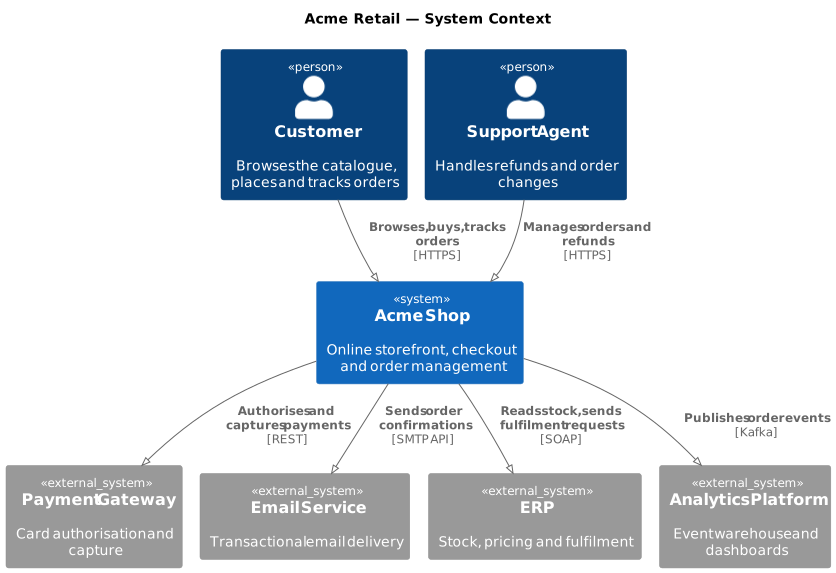
Sequence
Interactions over time, with alternatives, loops, notes and numbering.
Checkout Flow.puml
@startuml
title Checkout
autonumber
actor "Customer" as customer
participant "Web Storefront" as web
control "Storefront API" as api
participant "Order Service" as orders
boundary "Payment Gateway" as gateway
database "Orders DB" as db

customer -> web : Place order
web -> api : POST /checkout
api -> orders : PlaceOrder(basket)
orders -> db : INSERT order (pending)
orders -> gateway : Authorise(card, amount)
alt authorised
  gateway --> orders : authorisation id
  orders -> db : UPDATE order (paid)
  orders --> api : OrderPlaced
  api --> web : 201 Created
  web -> customer : Show confirmation
else declined
  gateway --> orders : declined
  orders -> db : UPDATE order (payment failed)
  orders --> api : PaymentDeclined
  api --> web : 402 Payment Required
  web -> customer : Ask for another card
end
note over orders, gateway : Idempotency key = order id, so a retried request never double-charges
@enduml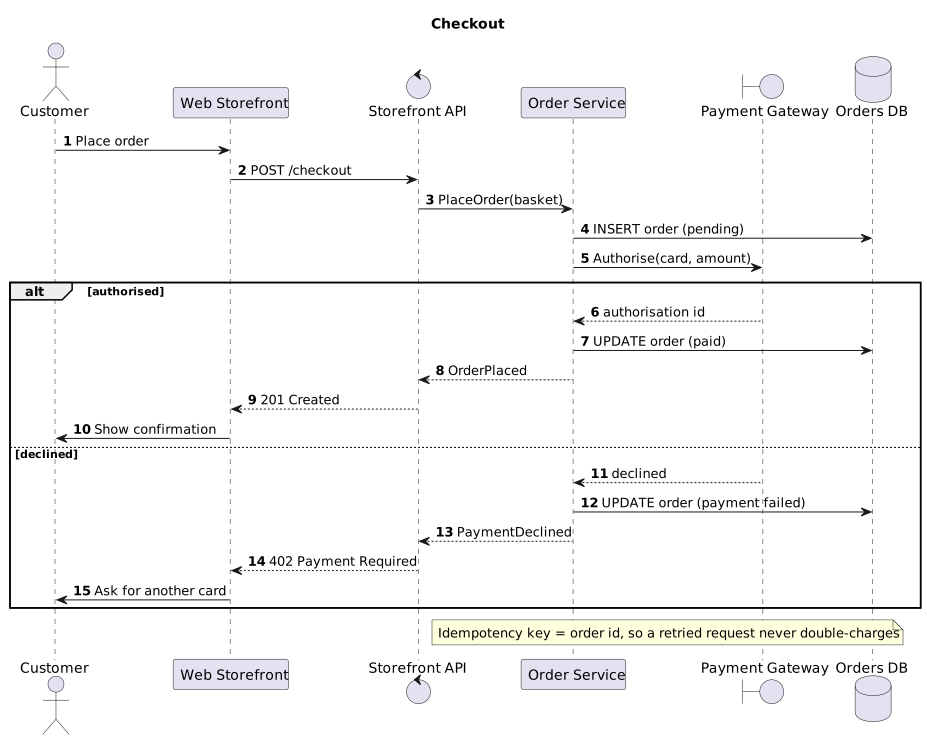
Cloud architecture
The official AWS, Azure, Google Cloud and Kubernetes icon sets, plus product logos: about 4,100 icons.
Serverless Order Pipeline.puml
@startuml
' diagram-type: cloud
title Serverless order pipeline (AWS)
!include <awslib/AWSCommon>
!include <awslib/NetworkingContentDelivery/CloudFront>
!include <awslib/ApplicationIntegration/APIGateway>
!include <awslib/Compute/Lambda>
!include <awslib/Database/DynamoDB>
!include <awslib/ApplicationIntegration/EventBridge>
!include <awslib/ApplicationIntegration/SimpleQueueService>
actor "Shopper" as shopper
rectangle "**AWS account — prod**" as aws {
  CloudFront(cdn, "CloudFront", "CDN")
  APIGateway(apigw, "API Gateway", "HTTP API")
  Lambda(place, "place-order", "Node.js")
  DynamoDB(orders, "orders", "On-demand")
  EventBridge(events, "Order events", "Custom bus")
  SimpleQueueService(queue, "fulfilment", "FIFO queue")
  Lambda(fulfil, "fulfil-order", "Node.js")
}
shopper -right-> cdn : HTTPS
cdn -right-> apigw : /api/*
apigw -right-> place : invoke
place -right-> orders : put item
place -down-> events : OrderPlaced
events -right-> queue : rule: OrderPaid
queue -right-> fulfil : batch of 10
fulfil -up-> orders : update status
@enduml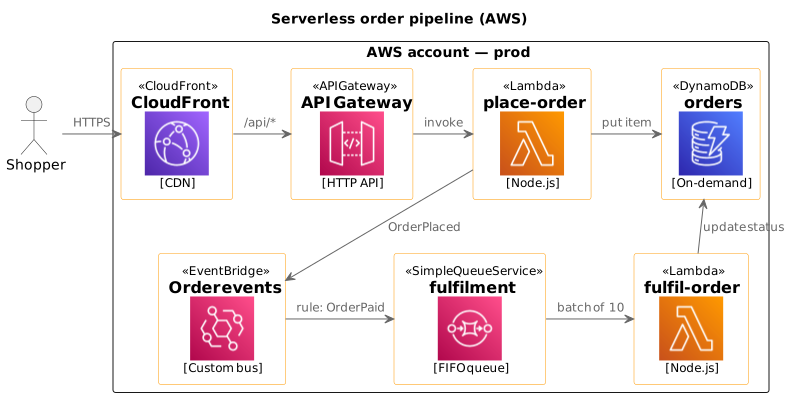
Entity relationship
Data models in crow’s-foot notation, keys and foreign keys marked.
Orders Schema.puml
@startuml
' diagram-type: ie
title Orders schema
hide circle
skinparam linetype ortho
entity "customer" as customer {
  * id : uuid
  --
  email : text
  full_name : text
  created_at : timestamptz
}
entity "address" as address {
  * id : uuid
  --
  * customer_id : uuid <<FK>>
  line_1 : text
  city : text
  postcode : text
  country : char(2)
}
entity "order" as order {
  * id : uuid
  --
  * customer_id : uuid <<FK>>
  * shipping_address_id : uuid <<FK>>
  status : order_status
  total_minor : bigint
  currency : char(3)
  placed_at : timestamptz
}
entity "order_line" as order_line {
  * id : uuid
  --
  * order_id : uuid <<FK>>
  * product_id : uuid <<FK>>
  quantity : int
  unit_price_minor : bigint
}
entity "product" as product {
  * id : uuid
  --
  sku : text
  name : text
  price_minor : bigint
  active : bool
}
entity "payment" as payment {
  * id : uuid
  --
  * order_id : uuid <<FK>>
  gateway_ref : text
  amount_minor : bigint
  state : payment_state
  captured_at : timestamptz
}
entity "shipment" as shipment {
  * id : uuid
  --
  * order_id : uuid <<FK>>
  carrier : text
  tracking_ref : text
  shipped_at : timestamptz
}
customer ||--o{ address : has
customer ||--o{ order : places
address |o--o{ order : ships to
order ||--o{ order_line : contains
product ||--o{ order_line : appears in
order ||--o{ payment : paid by
order ||--o| shipment : fulfilled by
@enduml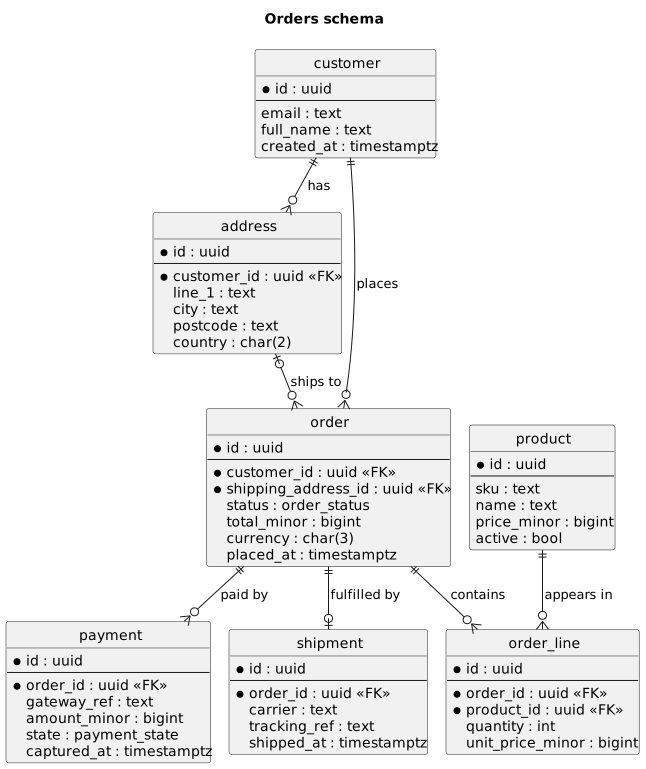
And the rest of PlantUML
State, class, activity, deployment and use case diagrams. If PlantUML draws it, so does the app.
Order Lifecycle.puml
@startuml
title Order lifecycle

[*] --> Pending : place order
Pending --> Paid : payment authorised
Pending --> PaymentFailed : payment declined
PaymentFailed --> Pending : retry with new card
PaymentFailed --> Cancelled : customer gives up
Paid --> Shipped : ERP confirms dispatch
Paid --> Cancelled : cancelled before dispatch\n(refund issued)
Shipped --> Delivered : carrier confirms
Delivered --> Returned : return within 30 days
Returned --> [*]
Delivered --> [*]
Cancelled --> [*]

Pending : reserve stock
Paid : capture payment
Shipped : notify customer
@enduml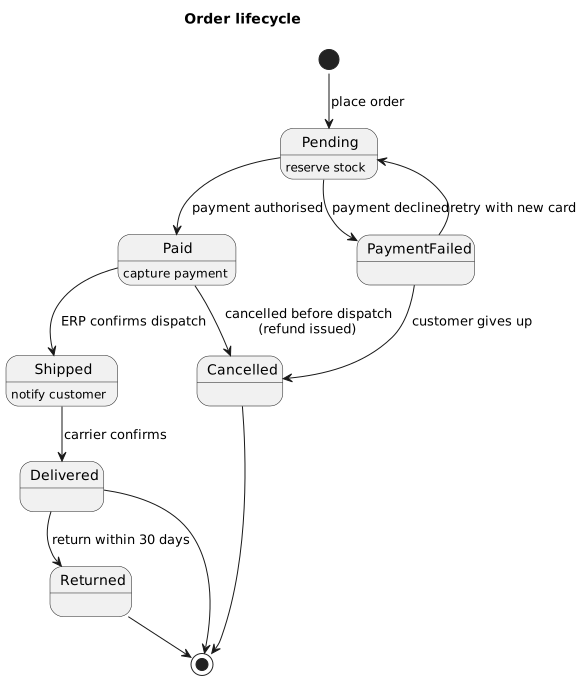
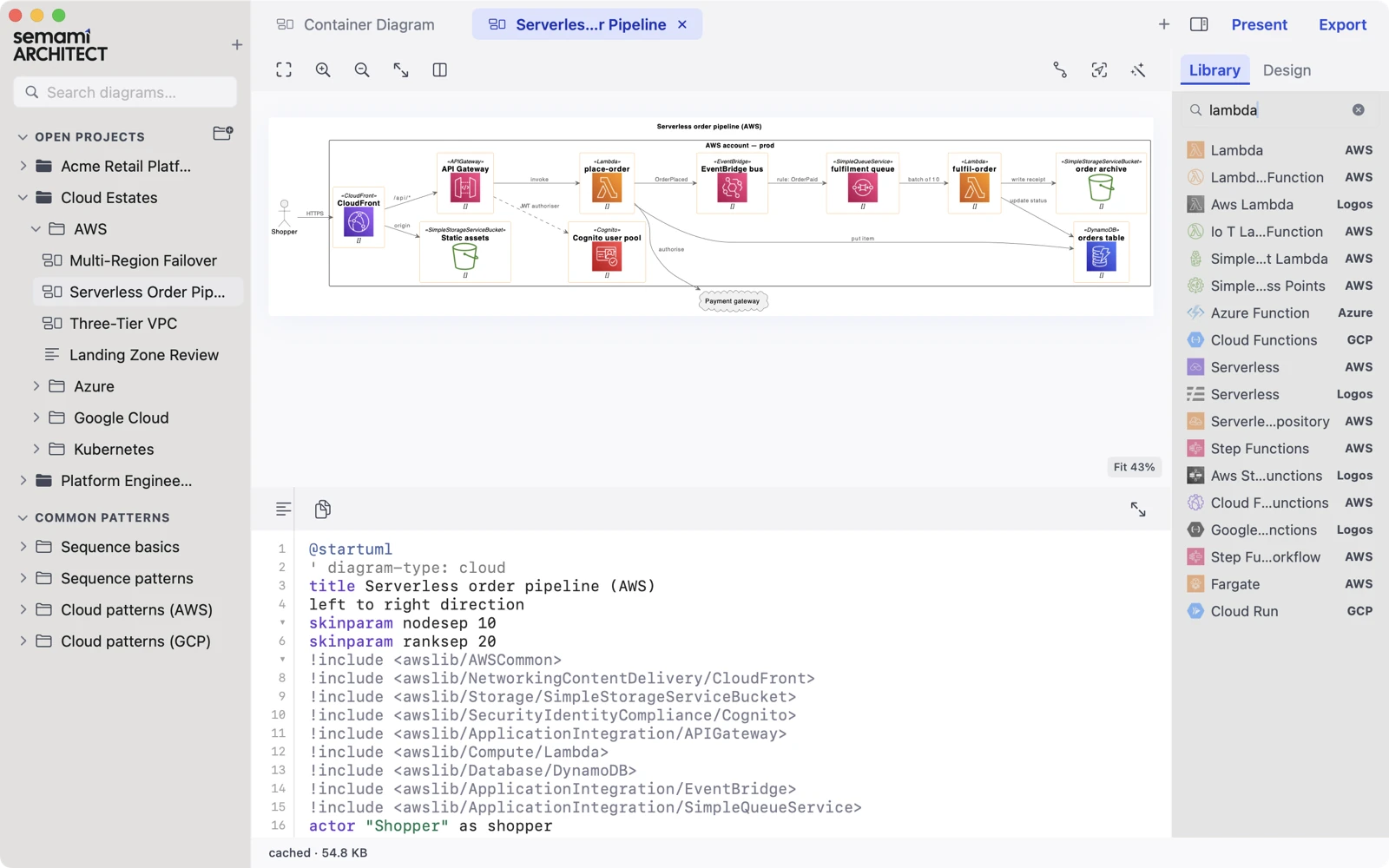
Search the icons, not the docs
Type lambda, drag the result into the diagram, and the right !include lines are added for you. Add your own images to My Library and use them like the built-in ones.
Plain files
A diagram change is a diff
Every diagram is a .puml text file in a folder you choose. Keep it in git beside the code it describes, and review changes the way you review code.
- Clone and carry on. A teammate opens the repository as a project and picks up where you left off.
- Share a link. Copy a diagram as a PlantUML URL. It opens on plantuml.com for anyone without the app.
- Readers don’t need the app. The files are standard PlantUML: no proprietary format, no account, nothing to lock you in.
- Bring what you have. Open a folder of existing
.pumlfiles, or paste a PlantUML URL.
@@ -8,11 +8,13 @@ System_Boundary(shop, "Acme Shop") {
   Container(web, "Web Storefront", "React")
   Container(api, "Storefront API", "Kotlin")
   ContainerDb(db, "Orders DB", "PostgreSQL")
+  ContainerQueue(bus, "Event Bus", "Kafka")
 }
 System_Ext(pay, "Payment Gateway")

 Rel(customer, web, "Buys from", "HTTPS")
-Rel_R(web, api, "Calls", "JSON")
+Rel_R(web, api, "Places orders", "JSON")
 Rel(api, db, "Reads and writes", "JDBC")
 Rel_R(api, pay, "Takes payments", "REST")
+Rel(api, bus, "Publishes events")
@endumlAround the diagram
Write it up, present it, tidy it
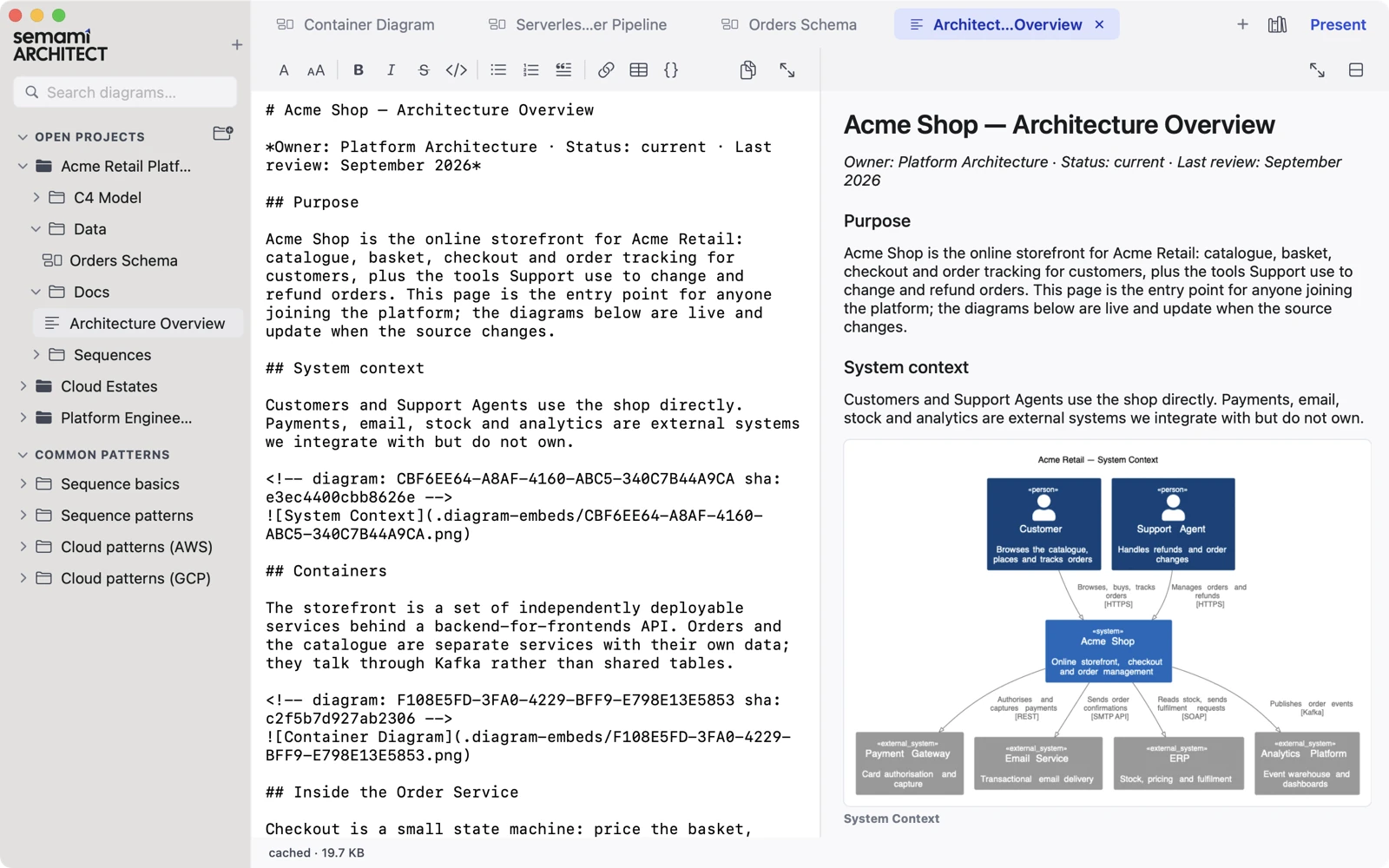
Write-ups with live diagrams
Markdown pages sit beside your diagrams and embed them. Change a diagram and the page updates. Copy a page for Confluence with the images inline.
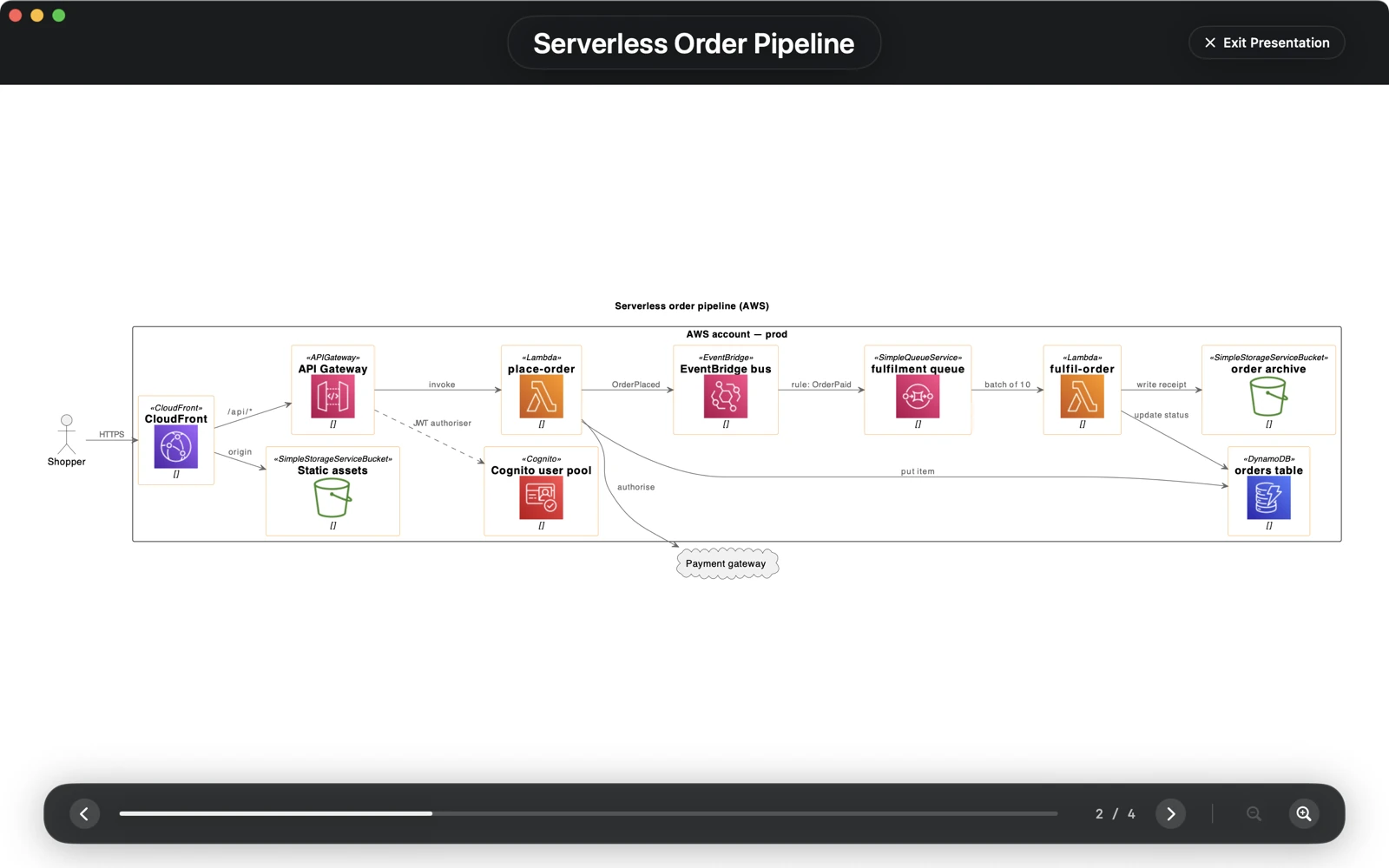
Present
Turn a set of open tabs into a full-screen walkthrough for the review meeting, with a notebook view for tall diagrams.
-
Tidy Layout
One click reorganises a busy diagram: fewer crossings, fewer overlaps. Every tidy is an ordinary text edit you can undo and diff.
-
Export and print
SVG and PNG export, printing, and Copy as PlantUML URL for chat and tickets.
-
Find anything
Quick Open, workspace search, and syntax highlighting with the error line marked.
Agent Access
Bring your own AI, or none
The app has no AI of its own and sends nothing to one. If your organisation has approved an assistant, such as Claude Code, turn on Agent Access and it can create and update diagrams in your workspace.
- Off by default. A local MCP server that listens only on this Mac.
- Token-protected. Your assistant needs a token the app issues; turn the feature off and the port closes.
- Checked before it is saved. Every diagram the assistant makes is rendered first, so it cannot hand you one that does not draw. New work opens as an unsaved tab for you to review.
{
  "mcpServers": {
    "semami-architect": {
      "url": "http://127.0.0.1:41414/mcp",
      "headers": {
        "Authorization": "Bearer <your token>"
      }
    }
  }
}
Price
Buy it once.
One download: no subscription, no account, no in-app purchases. Launch price until December 31st.
Coming soon to the Mac App StoreThere is no trial: if the app is not for you, request a refund from Apple within 14 days. Questions before you buy? support@webzakimbo.com
- macOS
- 13 Ventura or later
- Mac
- Apple silicon (M1 or later). Intel Macs are not supported.
- Network
- None needed. Nothing else to install.
- Privacy
- No account, no analytics, no tracking. The app never uploads your diagrams; the only thing it sends on its own is a crash or hang report, without diagram contents. Privacy policy
Before you buy
Is there a free trial?
No. If the app is not for you, Apple refunds the purchase within 14 days.
Will my existing diagrams open?
Yes. Add the folder as a project. The app draws standard PlantUML with the bundled 1.2025.4 engine. Because layout uses Smetana, a diagram can look different from a Graphviz render. If something that works elsewhere fails here, send it to us.
What if I stop using it?
Your diagrams are plain .puml files in your own folders. Any PlantUML tool can open them, and deleting the app leaves them where they are.
Is it for teams?
Yes, through the files. Share them with git or any shared folder; there is no team account. Readers don’t need the app: a PlantUML URL opens in a browser.